Development
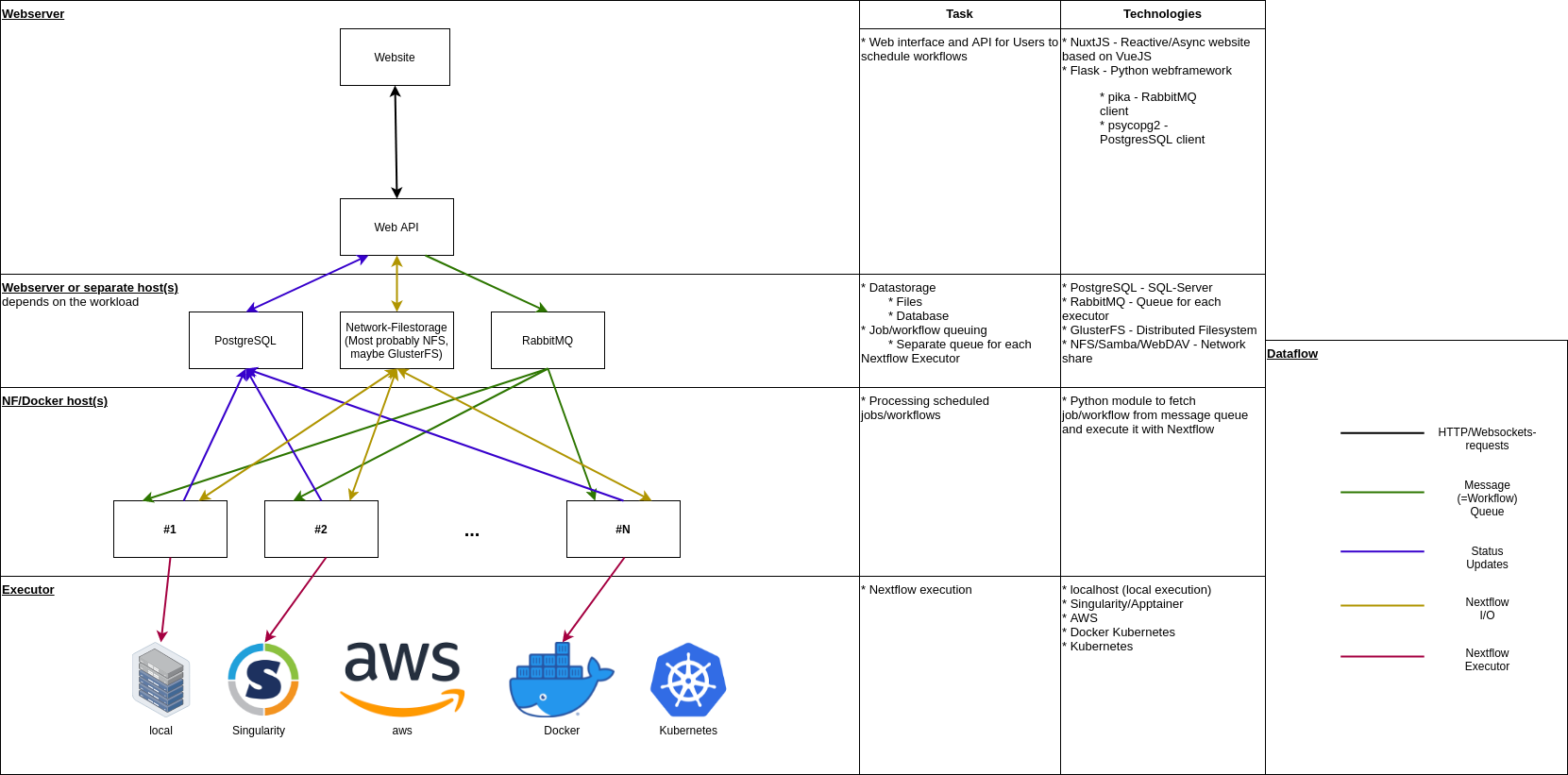
Structure
Backend
A web API written in Flask for managing/scheduling workflows.
Frontend
A web interface written in NuxtJS. This is basically a GUI for the web API.
Worker
A worker written in python which runs the scheduled workflows.
Requirements
Most dependencies are installed using Conda and the provided environment.yml, therefor this step will repeat in each components. Some components require a additional steps:
Follow the steps in the next paragraph to setup MAcWorP up completely.
Prepare development environment
# Install Nextflow in the root directory of the repository. Follow https://www.nextflow.io/docs/latest/install.html

# Create environment
conda env create -f environment.yml

# Already creates the environment and need updates???
conda env update -f environment.yml --prune

# Upgrade pip and setuptools
conda activate macworp

# Install node requirements
yarn --cwd ./frontend install
Start
In each shell te conda environment need be activated
# Shell 1
docker-compose up
# Shell 2
python -m macworp_backend database migrate
python -m macworp_backend utility rabbitmq prepare
honcho -e dev.env start
# Shell 3
# Worker needs to run outside of honcho otherwise SDKMAN is not properly initialized when running Nextflow
env PYTHONUNBUFFERED=1 python -m macworp_worker -n ./nextflow -s $(which snakemake) -c http://localhost:3001 -r amqp://admin:developer@127.0.0.1:5674/%2f -q project_workflow -d ./uploads -u worker -p developer -vvvvvvvv| Component | Access | User | Password |
|---|---|---|---|
| Frontend | http://localhost:5001 |
||
| API | http://localhost:3001 |
||
| Fusionauth | http://localhost:9011 |
developer@example.com |
developer |
For development, Flask is configured to add CORS-Headers by default.
Database migrations
To keep track of database changes, this project uses peewee_migrate.
Migrations are located in macworp/migrations/. For now this needs to be added manually when using pw_migrate.
Create new migration
pw_migrate create --directory macworp/migrations --database postgresql://postgres:developer@127.0.0.1:5434/macworp --directory backend/src/macworp_backend/migrations "<description>"
Run migrations
pw_migrate migrate --database 'postgresql://postgres:developer@127.0.0.1:5434/macworp' --directory backend/src/macworp_backend/migrations
Test data
Use python -m macworp database seed --drop to insert some test records (e.g. workflows) into the database.
Accessing the database
psql postgresql://postgres:developer@127.0.0.1:5434/macworp
Coding rules
- Use typed Python
- Use
pylintandblackformatterfor clean code (both are installed as development dependencies)
Testing deployment
Checkout quickstart guide to setup a fully instance of MAcWorP including SSL certificate.
Generate docs
mkdocs serve